Good Grants uses a WYSIWYG editor for formatting. Basic Markdown is also supported for simple styling.
Enable formatting for entrants
- In the Manage workspace, go to Forms
- Click the ellipsis (three dots) beside a form and choose Form settings
- Open the 'Advanced' tab
- Select Enable HTML editor for applicants
- Click Save
Markdown formatting examples
Bold
This is how you **bold** text
This is how you bold text
Italics
This is how you *italicise* text
This is how you italicise text.
Bulleted lists
* Bullet one
* Bullet two
Numbered lists
1. Step one
2. Step two
- Step one
- Step two
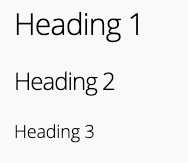
Headings
# Heading 1
## Heading 2
### Heading 3
Good to know
- The editor includes built-in formatting tools (bold, italics, headings, links, and more).
- Lists are not supported in field labels—use the hint field instead.
- Markdown support is limited to basic formatting only.
https://help.goodgrants.com/hc/en-gb/categories/11716113120143-Getting-started
/hc/theming_assets/01JKXREJTA5QVDAK3M037DSGCA
Getting started
Configure basic account settings, manage content, update your theme, and more.
custom
https://help.goodgrants.com/hc/en-gb/categories/11716152489615-Accounts-and-billing
/hc/theming_assets/01JKXR62045TGWSE6846EC1FYX
Accounts and billing
Update account ownership, view billing details, and more.
custom
https://help.goodgrants.com/hc/en-gb/categories/11716168576143-Video-library
/hc/theming_assets/01JKXR775ZXJV2GF0M2A5HP0M0
Video library
Watch videos to learn how to best utilise the Good Grants platform.
custom
https://help.goodgrants.com/hc/en-gb/categories/11716113225359-Pre-award
/hc/theming_assets/01JKXRA440P6GR3VVPT45PAW0G
Pre-award
Build your application form, configure action tasks, and communicate with users.
custom
https://help.goodgrants.com/hc/en-gb/categories/11716159629583-Open-award
/hc/theming_assets/01JKXRBVGN89796XE44EQ3R7Z2
Open award
Manage program users and applications.
custom
https://help.goodgrants.com/hc/en-gb/categories/11716152357391-Post-award
/hc/theming_assets/01JKXRD18QM03AFJEP8AQ0KHJD
Post award
Evaluate applications, award grants, and monitor grantee performance.
theme, reviewing, broadcast
